
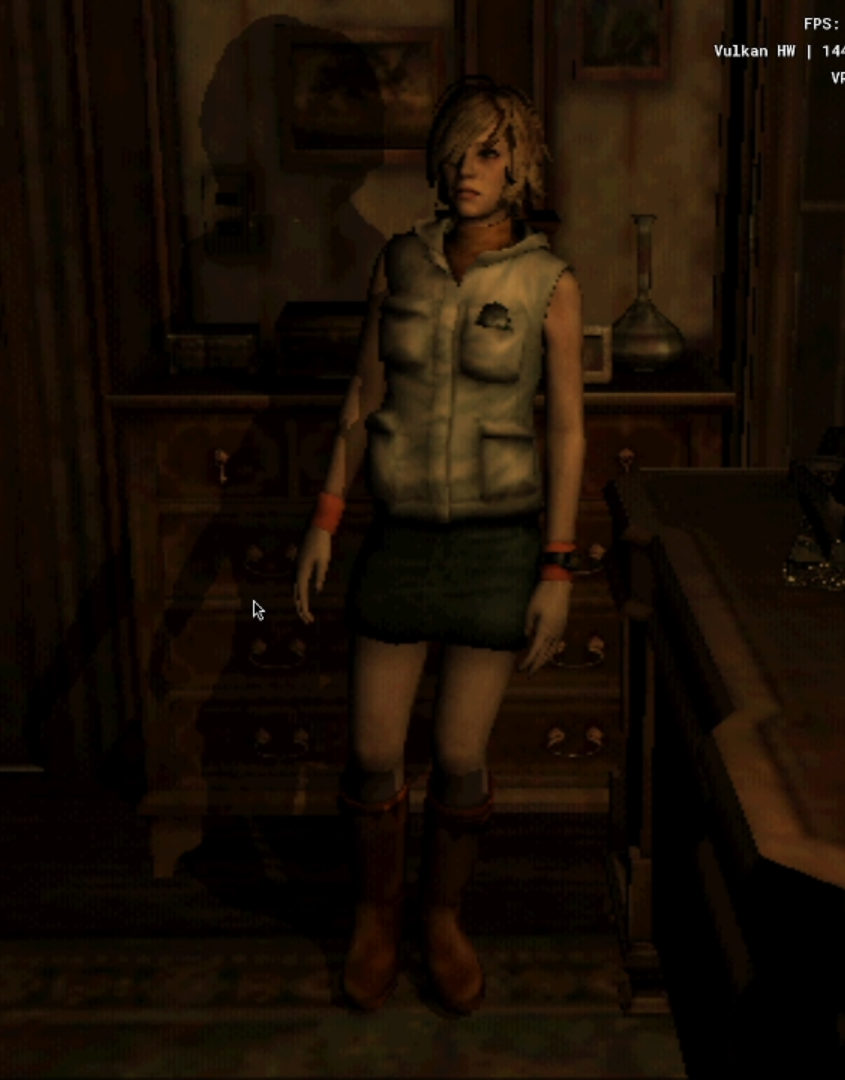
It all starts while playing Silent Hill 2. It is possible to see dynamic shadows where the shape depends on the direction and the mesh of the affected object.
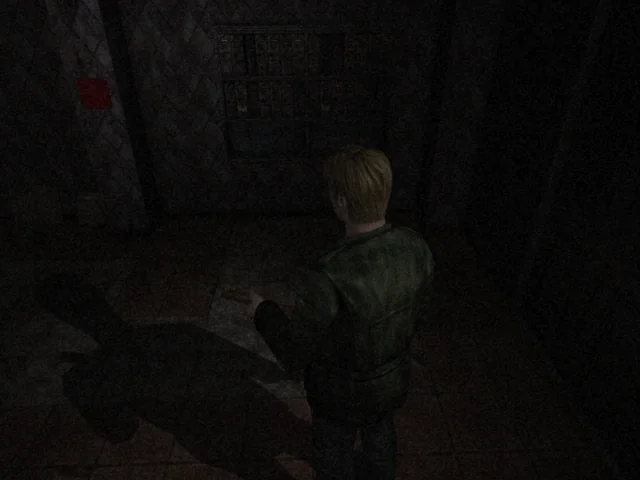
And the question is… But how?
So we begin. First, we use PS2SDK and C. With my own C subset “with classes”. Keep in mind that PS2SDK is almost linux-only. I spent a few days trying to set it up through WSL/MSYS2, but it will just give you headaches. So okay, we have the project running. But… we have to assume several things. One is that you know how to render models by sending GIFs (Graphics Interface) and you know how to “manipulate data”, aka parsing 3D models to binaries and reading them through the game code/loop. I will post articles on how this might be possible, but that’s not the point of this one!
Okay, assuming all that… But how? Sometimes it seems like it wasn’t even meant to be possible because the Graphics Synthesizer, the PS2 GPU, only receives pre-processed information. This basically means you already have to send everything as it should appear on the screen. The points on the screen already processed, the colors, the textures, etc. It will only render what has already been processed, unlike modern GPU pipelines, and, also unlike modern GPUs, it is not programmable and features a Fixed-Pipeline; you basically just set the configurations you want. Similar to old GPUs from the 90s. Okay, now that you know this, how?
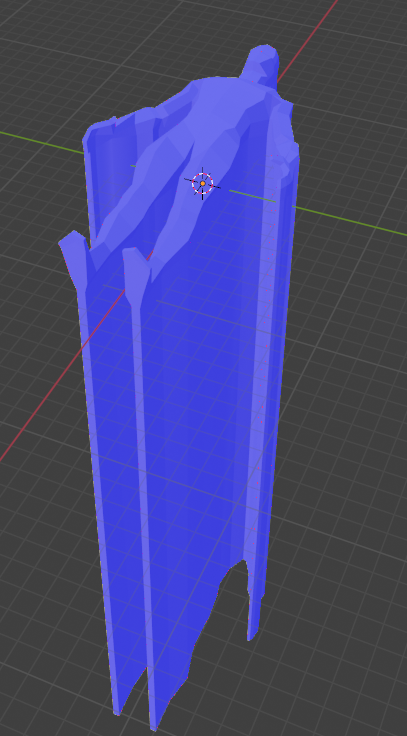
So let’s say we are rendering a model, in this case a ripped model of Heather from Silent Hill 3. What you need to do is basically tunnel the model. What do I mean by that? Basically, you will grab the faces opposite to some point, say a “““LAMP”””, which in this case would just be a point in world-position. You grab the position of this point in the world, do a calculation of all faces of the model (in this case Heather) that are in the OPPOSITE DIRECTION to the lamp. i.e.:
VECTOR lamp_pos = {10, 10, 10, 0}; // The coordinates are X, Y, Z, the zero at the end is because the CPU (Emotion Engine, EE) must have aligned addresses or it crashes.
VECTOR heather_pos = {0, 0, 0, 0}; // At the origin

Now, you loop through ALL faces of the model.

Entity *heather = get_EntityByName("HEATHER");
for (int i = 0; i < mesh->linear_count; i += 3) {
    VECTOR v_local[3];

    // Let's look at it vertex by vertex for each triangle
    for (int v = 0; v < 3; v++) {
        int idx = i + v;
        float vx = mesh->linear_vertices[idx][0];
        float vy = mesh->linear_vertices[idx][1];
        float vz = mesh->linear_vertices[idx][2];

        float nx = mesh->linear_normals[idx][0];
        float ny = mesh->linear_normals[idx][1];
        float nz = mesh->linear_normals[idx][2];

        // 1. Calculate direction: from light to vertex
        float lx = mesh->lights[0][0] - vx;
        float ly = mesh->lights[0][1] - vy;
        float lz = mesh->lights[0][2] - vz;

        // 2. Calculate opposite direction: vertex fleeing from light
        float px = vx - mesh->lights[0][0];
        float py = vy - mesh->lights[0][1];
        float pz = vz - mesh->lights[0][2];

        // 3. The Dot Product tells us where the face is pointing.
        float dot = (nx * lx) + (ny * ly) + (nz * lz);
        float shadow_epsilon = 0.0f;

        // If it's negative, the face is pointing away from the light.
        if (dot < shadow_epsilon) {
            // Pushes the vertex in the opposite direction of the light, stretching the face!
            vx += px * mesh->lights[0][3];
            vy += py * mesh->lights[0][3];
            vz += pz * mesh->lights[0][3];
        }

        v_local[v][0] = vx;
        v_local[v][1] = vy;
        v_local[v][2] = vz;
        v_local[v][3] = 1.0f;
    }
    // ... transform to screen space ...
}
Okay, now that all faces that aren’t “facing” the lamp are sort of selected, you throw them in the opposite direction. Now your character will look like a tunnel. This is a technique that is commonly used with normal Stencil Shadows anyway.
And now? Is the character a tunnel? No. You do two passes: one rendering the normal character, and the other with the tunneled character. Your normal character is the character the player will see, and the tunneled one, where the “volume” touches, will be the shadow. Keep in mind that the copy object must copy the pose and everything else from the original character, otherwise your shadow will be a T-Pose while the character is Idle or something similar.
But how do you tell the GPU what is the front of the tunnel and what is the back of the tunnel?
You do this by calculating the 2D Cross Product right after projecting the vertices on the screen. If the result is positive, the face is looking at the camera (front pass). If it’s negative, it is facing away (back pass). With the faces divided into two lists, we send them to the GPU to be drawn. And this is where the problems begin.
// 2D Cross Product projected on the screen to find orientation (Front vs Back)
float dx1 = sx[1] - sx[0]; float dy1 = sy[1] - sy[0];
float dx2 = sx[2] - sx[0]; float dy2 = sy[2] - sy[0];
float cross = (dx1 * dy2) - (dx2 * dy1);

// Separation into DMA lists
if (cross > 0.0f) {
    for (int k = 0; k < 3; k++) {
        front_pass[front_count].x = (u16)(sx[k] * 16.0f);
        front_pass[front_count].y = (u16)(sy[k] * 16.0f);
        front_pass[front_count].z = (u32)(sz[k]);
        front_count++;
    }
} else {
    for (int k = 0; k < 3; k++) {
        back_pass[back_count].x = (u16)(sx[k] * 16.0f);
        back_pass[back_count].y = (u16)(sy[k] * 16.0f);
        back_pass[back_count].z = (u32)(sz[k]);
        back_count++;
    }
}
Now comes the trick that took me a long time:
The PS2 has no stencil buffer. In modern hardware you basically have a buffer (an almost sandbox memory zone) where you can store information and use it however you see fit. But on the PS2 we don’t have that. The only things we have are framebuffers.
So normally, the setup looks like this:
Front buffer (What is currently on screen): (WidthxHeight)*4, so let’s say your screen is 640x480, that is (307200)*4, which is 1228800 bytes. This is ~1.2MB
Back buffer (What the GPU is currently drawing on): Also 1.2MB.
Keep in mind that the PS2 has 4MB of VRAM. That’s right. I believe you already see the problem. 1.2MB * 2 is 2.4MB. And as stated before, the PS2 has no stencil buffer. So that’s it. You need ANOTHER screen just for special effects. That means +1.2MB for another buffer. Now you are using 3.6MB of VRAM.
But… why not use the other already utilized buffers? What if I was very clever and used the Alpha Buffer (8 bits) of the front or back buffer as storage? Then I could, while not using alpha, have the alpha channel as my stencil buffer! Good line of thought, but no. If you check the Graphics Synthesizer guide, GS Users Manual.pdf, you’ll see that there is no Z-testing with alpha. This forces you to have some R, G, or B buffer as a stencil buffer.
To stain this third buffer, we disable Z writes (disable_z_write) so the tunnel geometry doesn’t glitch the map floor, and interact with the Alpha.
On the first pass (Front pass), you simply draw the front faces of the tunnel staining the Alpha channel of the buffer.
On the second pass (Back pass), comes the magic: You configure the GPU register turning on DATE (Destination Alpha Test Enable). This tells the hardware: “ONLY draw this back part of the tunnel EXACTLY on the pixels where the front part just stained”. Doing this by injecting DMA tags manually in the middle of the loop would kill the code. To solve this, I package this into C helper functions. For example, draw_inject_gs_register(q, register, value) shoves the cruel GS state changes directly into the registers via A+D (Address + Data) packets.
View advanced code: Inside Helper Functions (DMA & GIF Tags)
// Helper to inject data directly into GPU registers via A+D tag
qword_t* draw_inject_gs_register(qword_t *q, u8 reg_addr, u64 data) {
    // 1. QWORD 0: The GIF Tag
    // NLOOP=1, EOP=1 (End of Packet), NREG=1
    q->dw[0] = 0x1000000000008001ULL;

    // Register Descriptor: 0x0E means A+D (Address + Data) mode
    q->dw[1] = 0x000000000000000EULL;
    q++;

    // 2. QWORD 1: The Payload
    q->dw[0] = data;          // Lower 64 bits: The actual data for the register
    q->dw[1] = (u64)reg_addr; // Upper 64 bits: The target GS register address
    q++;

    return q; // Return the incremented pointer to keep the chain going!
}
qword_t* graph_draw_fullscreen_textured_q(qword_t *q, texbuffer_t *tex, u32 clut_addr, lod_t *lod, int quad_w, int quad_h, u8 r, u8 g, u8 b, u8 a) {

    clutbuffer_t active_clut = {0};
    active_clut.address = clut_addr;
    active_clut.psm = GS_PSM_32;
    active_clut.storage_mode = CLUT_STORAGE_MODE1;
    active_clut.start = 0;
    active_clut.load_method = CLUT_LOAD;

    q = draw_texturebuffer(q, 0, tex, &active_clut);
    q = draw_texture_sampling(q, 0, lod);
    q = draw_inject_gs_register(q, GS_REG_TEXFLUSH, 0);

    q->dw[0] = 0x1000000000008006ULL;
    q->dw[1] = 0x000000000000000EULL; q++;

    q->dw[0] = GIF_SET_PRIM(6, 0, 1, 0, 1, 0, 0, 0, 0)
    q->dw[1] = 0x00ULL; q++;

    q->dw[0] = GS_SET_RGBAQ(r, g, b, a, 0);
    q->dw[1] = 0x01ULL; q++;

    int half_w = quad_w / 2;
    int half_h = quad_h / 2;

    q->dw[0] = 0x00ULL;
    q->dw[1] = 0x02ULL; q++;
    q->dw[0] = GIF_SET_XYZ((2048 - half_w)<<4, (2048 - half_h)<<4, 0);
    q->dw[1] = 0x05ULL; q++;

    union { float f; u32 i; } s, t;
    s.f = 1.0f;
    t.f = 448.0f / 512.0f;

    q->dw[0] = (u64)s.i | ((u64)t.i << 32);
    q->dw[1] = 0x02ULL; q++;
    q->dw[0] = GIF_SET_XYZ((2048 + half_w)<<4, (2048 + half_h)<<4, 0);
    q->dw[1] = 0x05ULL; q++;

    return q;
}
// Turn off Z write on main buffer
u64 disable_z_write = (zbp) | (zpsm << 24) | ((u64)1 << 32);
q = draw_inject_gs_register(q, 0x4E, disable_z_write);

// PASS 1: Inject the front geometry of the tunnel (Front Pass)
u64 normal_z_test = (0ULL << 0) | (0ULL << 14) | (0ULL << 15) | (1ULL << 16) | (2ULL << 17);
q = draw_inject_gs_register(q, 0x47, normal_z_test);

u64 *dw = (u64*)draw_prim_start(q, 0, &mesh->prim, &color);
for(int i = 0; i < front_count; i++) {
    *dw++ = 0ULL;
    *dw++ = 0x00000001ULL;
    *dw++ = front_pass[i].xyz;
}
q = draw_prim_end((qword_t*)dw, 3, 0x412);

// PASS 2: The back of the tunnel with DATE (Destination Alpha Test Enable) turned on
u64 back_pass_test = (0ULL << 0)
                   | (7ULL << 1)
                   | (1ULL << 14)   // DATE = ON (Tests Destination Alpha!)
                   | (1ULL << 15)   // DATM = 1
                   | (1ULL << 16)   // ZTE = 1
                   | (3ULL << 17);  // ZTST = GEQUAL

q = draw_inject_gs_register(q, 0x47, back_pass_test);

u64 *dw2 = (u64*)draw_prim_start(q, 0, &mesh->prim, &color2);
for(int i = 0; i < back_count; i++) {
    *dw2++ = 0ULL;
    *dw2++ = 0x00000001ULL;
    *dw2++ = back_pass[i].xyz;
}
q = draw_prim_end((qword_t*)dw2, 3, 0x412);
What’s left drawn in virtual memory after this is the core of the volume where the shadow should hit the scenery.
But the problems aren’t over yet. You stained the ghost buffer, but the main screen (Back buffer) remains intact. How do we pass the shadow to the game?
You will draw a Quad (two triangles) that takes up the entire screen, where the target is the game screen, but the texture is our pseudo-stencil. Before drawing, you will have to do a BITBLT to convert this heavy buffer of ours to 8-bits, and allocate a Color Look Up Table (CLUT) to translate this stain into dark pixels.
Giant functions like drawing the quad on the entire screen, using the converted buffer texture, I encapsulate in the helper graph_draw_fullscreen_textured_q(), which generates the heavy DMA chain and applies the palette over the screen for me. i.e:
// Local-to-local copy: The pseudo-stencil PSM_32 -> PSM_8 so we can use the CLUT
u64 bitbltbuf = (stencil.address / 64)
              | ((u64)(stencil.width / 64) << 16)
              | ((u64)stencil.psm << 24)
              | ((u64)(stencil8.address / 64) << 32)
              | ((u64)(stencil8.width / 64) << 48)
              | ((u64)stencil8.psm << 56);

// ... (Injection of TRXPOS, TRXREG, TRXDIR packets for BitBlt) ...

// CLUT Setup: The shadow translator
static u32 clut_address = 0;
if (clut_address == 0) {
    clut_address = graph_vram_allocate(16, 16, GS_PSM_32, GRAPH_ALIGN_BLOCK);

    static u32 shadow_palette[256] __attribute__((aligned(16)));
    memset(shadow_palette, 0, sizeof(shadow_palette));

    // The trick: Index 0 stays transparent.
    // Any stained area (1 to 255) becomes black with 50% Alpha (128).
    for(int z = 1; z < 256; z++){
        shadow_palette[z] = 0x80000000;
    }

    upload_texture_to_vram(shadow_palette, 16, 16, GS_PSM_32, clut_address);
}

// Configure the converted buffer as an 8-bit texture
static texbuffer_t stencil8_tex;
stencil8_tex.info.width = log2(stencil8.width);
stencil8_tex.info.height = log2(stencil8.width);
stencil8_tex.info.components = TEXTURE_COMPONENTS_RGBA;
stencil8_tex.address = stencil8.address;
stencil8_tex.width = stencil8.width;
stencil8_tex.psm = GS_PSM_8;

// Draw the fullscreen Quad using the stained texture and the CLUT
q = draw_inject_gs_register(q, 0x47,
    (1ULL << 0)       |  // ATE=1
    (5ULL << 1)       |  // ATST=EQUAL
    (0x01ULL << 4)    |  // AREF=128
    (0ULL << 12)      |  // AFAIL=KEEP
    (0ULL << 16));       // ZTE=0

q = graph_draw_fullscreen_textured_q(q, &stencil8_tex, clut_address, &mesh->texture->lod, 512, 448, 128, 128, 128, 64);
In the end, you have this: